TimeTrakGO Logo
Employee Time Tracking & Time Clock Software2026-09-16T20:43:30+00:00

Employee Time Clock Software for Small Business

Know exactly who worked when, cut payroll errors, and get hours to your payroll provider without chasing down timesheets. Web, mobile, tablet, and physical time clocks. Free 14-day trial, no credit card required.

Employee time clock options
  • Simple & Intuitive

Time Clock Software for Employees

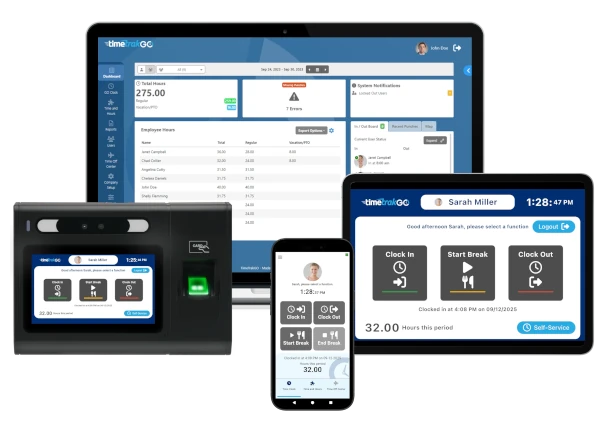
TimeTrakGO gives your team flexible employee time tracking with the accuracy and reliability of a dedicated time clock. Employees are clocking in correctly on day one, no training required. Every punch adds up to time cards you can hand straight to payroll.

Whether your team works from one office or across multiple job sites, clocking in works the same way.

Free setup assistance is included, and most accounts are up and running in minutes.
simple employee time card software

GOtime5

Every punch. Verified. In under a second.

Buddy punching and manual entry errors quietly drain small business profits. The GOtime5 stops both, with no badges to lose and no PINs to share.

Free 14-day trial of the TimeTrakGO software · No credit card required · Clock purchased separately
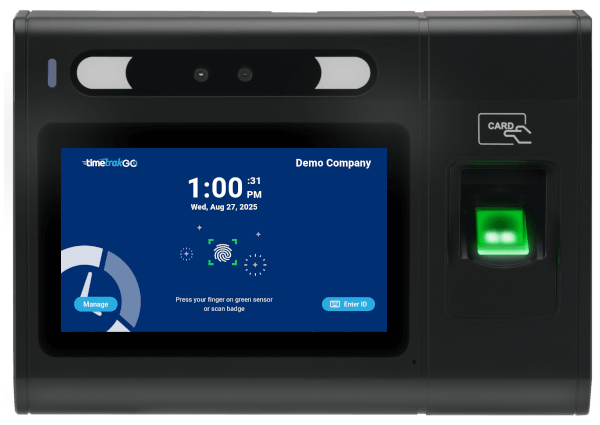
GOtime5 fingerprint employee time clock device with touchscreen
Employee time clock options
  • User Friendly

Multiple Employee Time Clock Options

Our intuitive employee time clock options make it easy for your employees to clock in and out with just a few clicks.

Choose from our Mobile App, Virtual Time Clock, PIN Entry Kiosk, and Facial Recognition and Physical Time Clocks, whichever fits your team, no IT department required.

  • Innovative Design

Employee Time Clock Dashboard

See everything at a glance: total hours worked, time-off requests, employee location, and who’s clocked in right now.

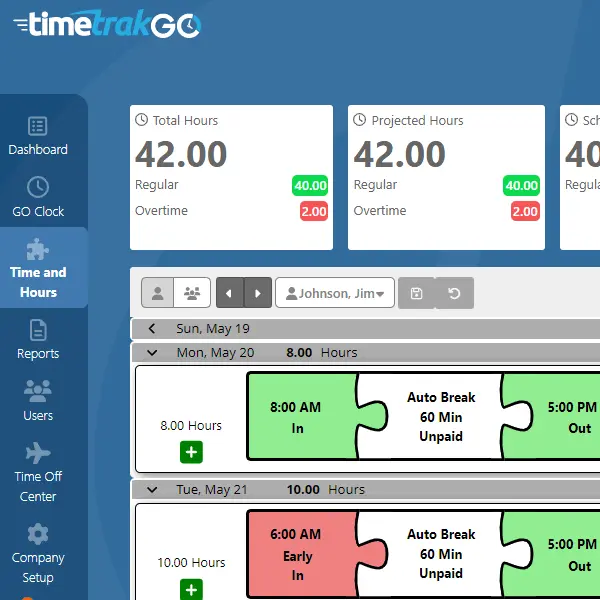
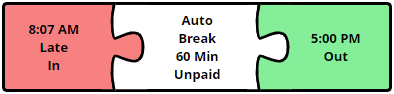
Punch errors are surfaced automatically, so you’re not checking timesheets person by person, just reviewing and correcting what the dashboard already flagged.

Edit time punches directly from the dashboard, with a full audit trail so you always know what changed and when.
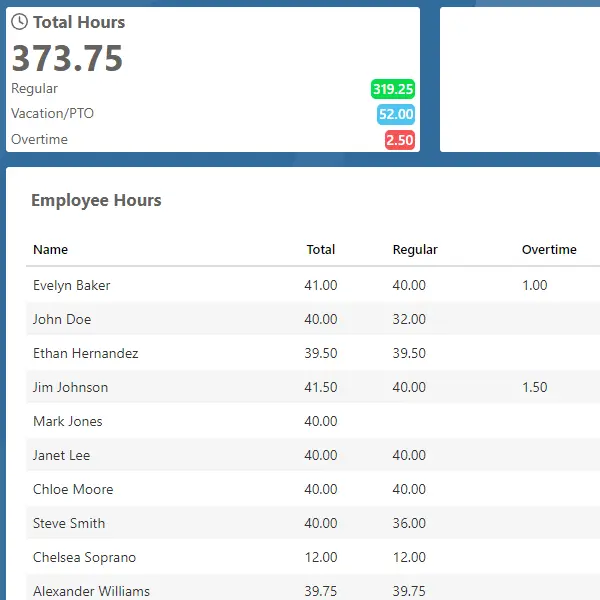
time clock software dashboard
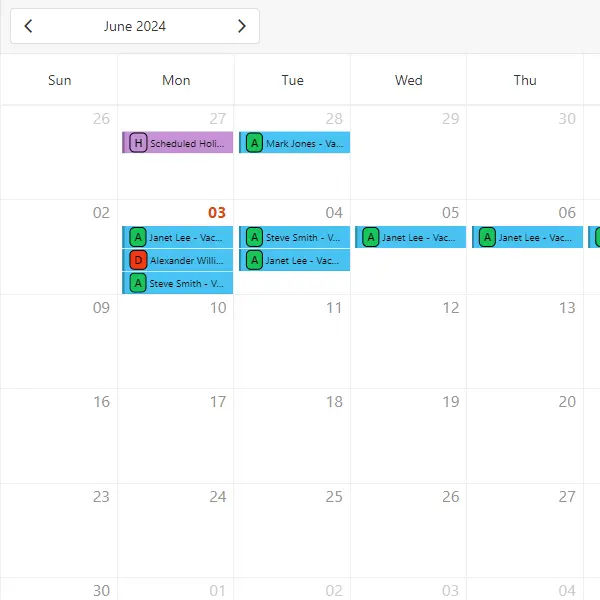
paid time off calendar view
  • Smart & Simple

Easy PTO Management

TimeTrakGO automates vacation, sick, and personal time tracking, eliminating spreadsheets, sticky notes, and manual calculations.

Set different accrual rules for different employee types, TimeTrakGO keeps each balance accurate on its own.

Employees submit requests in seconds, managers get instant email alerts, and approvals deduct time from balances automatically.

  • Precision Labor Tracking

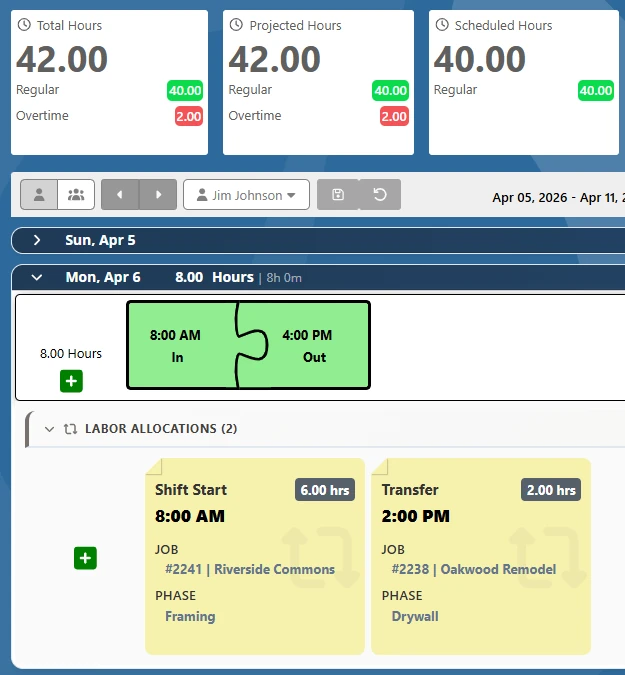
Job Costing and Labor Allocation

Assign employee hours to specific jobs, departments, or cost centers as they clock in, and let employees switch jobs mid-shift right from the time clock. Get the labor data you need for accurate job costing and smarter workforce decisions.

See where labor hours were spent before the week is over. Every hour is tagged, tracked, and ready for payroll or reporting.

Job Tracking with Labor allocation
AI Connect Feature
  • Ask. Get Answers.

Ask Your Time Clock Anything

AI Connect lets you query your time and attendance data using plain English. Ask who is clocked in, check hours for the week, or review schedules without digging through reports.

Your AI assistant connects directly to TimeTrakGO and delivers the answers you need in seconds.

TimeTrakGO
Time Clock Software Benefits
time clock software errors

Simplify Employee Time Tracking

Try Free for 14-days

Done Fighting With Timesheets?

Ditch the spreadsheets and the software that makes simple things complicated. TimeTrakGO sets up in minutes and gets out of your way.


Posted on Capterra Capterra
Whitney K. profile picture
Whitney K
14 August 2025
Capterra star 1Capterra star 2Capterra star 3Capterra star 4Capterra star 5Trustindex verifies that the original source of the review is Capterra.
Easy to Use TIMECARD SOFTWARE Overall: Overall signing up was easy. Onboarding was also a breeze. The price is great for what the software can do. My only wish is for somewhere for the team to add notes. Pros: Simple to use, easy to install the app on phones. Billing makes sense and the competitive price. Overall a good product. Cons: Nowhere for staff to leave notes within the system for missed punches. This creates some inefficiencies that I wish could be improved. I am hoping this note feature will be added. It would shave time off the weekly time card audit task.
Posted on Capterra Capterra
Verified Reviewer profile picture
Verified R
14 August 2025
Capterra star 1Capterra star 2Capterra star 3Capterra star 4Capterra star 5Trustindex verifies that the original source of the review is Capterra.
Easy to use. Overall: I am overall very pleased with TimeTrak Go and how easy it is to use. Adjusting time and logging someone's PTO hours is very easy. Pros: How easy it is to use. Keeping track of all the employees PTO hours is very helpful. All of our employees seem to have an easy time clocking in and out. I have had very little complaints since we have started using it. Cons: I wish we could differentiate between PTO and vacation hours. Sometimes the geotracking is also off, which makes it difficult to clock in and out.
Posted on Capterra Capterra
Lisa M. profile picture
Lisa M
11 August 2025
Capterra star 1Capterra star 2Capterra star 3Capterra star 4Capterra star 5Trustindex verifies that the original source of the review is Capterra.
Better Than QuickBooks Time - and Half the Price! Overall: I started using TimeTrakGo after getting frustrated with the cost of QuickBooks Time. The switch was simple, and their support team was phenomenal in guiding me through setup. I loved it so much that I moved both of my companies over. The system is easy to use, my team adapted quickly, and I really like the biometric and geofence features for accurate clock-ins. Best part? I’m now paying less than half of what I used to and getting the same core features. It’s been a smooth, positive experience from start to finish. Pros: What I like most about TimeTrakGo is how much value I’m getting for the price—it’s less than half of what I paid for QuickBooks Time, but it still gives me all the features I need. The support team is phenomenal—super quick to respond, friendly, and they actually solve the problem on the first try. It’s also really easy to use, so my employees had no trouble learning it. I love the biometric facial recognition for secure clock-ins and the geofence feature that makes sure mobile clock-ins happen only at approved locations. It’s just a solid, reliable system that works. Cons: Honestly, there’s not much I dislike, but if I could change one thing, it would be to add email or mobile app alert notifications for certain situations, like missed punches or when someone is close to overtime. I’d also like to see a way to approve timecards directly in the system instead of just adding notes. It works fine as is, but those two features would make it even better and save a little extra time during payroll.
Posted on Capterra Capterra
Karen F. profile picture
Karen F
8 August 2025
Capterra star 1Capterra star 2Capterra star 3Capterra star 4Capterra star 5Trustindex verifies that the original source of the review is Capterra.
Great Product, Great Customer Service Overall: Overall, I have been extremely satisfied. I highly recommend TimeTrakGO for keeping track of hourly employees clock times and PTO. Pros: The time keeping is easy to use and understand. The set-up was simple. The employees like it. It has made it easier to address missed punches quickly. The support is fantastic! Anytime that I have had a question, no matter how complex it seemed to me, a real person was there to help me. Their answers are clear and easy to understand. Cons: The only thing that I can think of is that I didn't know about it sooner. We had considered many products before we found TTG.
Posted on Capterra Capterra
Ethan B. profile picture
Ethan B
6 August 2025
Capterra star 1Capterra star 2Capterra star 3Capterra star 4Capterra star 5Trustindex verifies that the original source of the review is Capterra.
Solved lots of employee giving us wrong hours on the clock. Overall: Was set up in 15 minutes, started adding employee right away was up and running within 30 minutes and solved lots of problems. Pros: Very easy to navigate and set up. Also giving multiple options to employee how to enter their hours. Cons: Looking forward to be able to set up employee with a paid break VS having to add an extra 30 minutes a day.
Posted on Capterra Capterra
Theresa H. profile picture
Theresa H
6 August 2025
Capterra star 1Capterra star 2Capterra star 3Capterra star 4Capterra star 5Trustindex verifies that the original source of the review is Capterra.
Small Company Review Overall: We are a small company. Before we implemented this service, I was in charge of keeping up with time sheets. leave request, etc. all done in paper. This has freed up a lot of my time, and made it way more simple to track employee time and request off. Pros: The ease of real time use. Employees no longer have to turn in paper copies to be corrected, and corrected again. Cons: I would like to see it be able to line up to Fiscal year time lines. We were able to adjust the time line to make it work, but would be much easier if it was an option to pick.
Posted on Capterra Capterra
Anna H. profile picture
Anna H
5 August 2025
Capterra star 1Capterra star 2Capterra star 3Capterra star 4Capterra star 5Trustindex verifies that the original source of the review is Capterra.
TimeTrakGO - Affordable and Easy to Use Overall: Our overall experience has been exceptional. From installation of the software, to training and setup. I highly recommend. Pros: TimeTrakGo integrates with QuickBooks effortlessly. It's a great value and is easy to use. TimeTrakGO was an easy transition for our employees. Processing payroll now takes less than an hour after reviewing time reports. We have found customer service to be very responsive. I would recommend TimeTrakGO because of their customer service only, but it is a wonderful program Cons: So far I have not found anything that I dislike or think could use improvement. TimeTrakGo is perfect for our company.
Posted on Capterra Capterra
Faith S. profile picture
Faith S
5 August 2025
Capterra star 1Capterra star 2Capterra star 3Capterra star 4Capterra star 5Trustindex verifies that the original source of the review is Capterra.
Easy to use time clock!!! Overall: Before using TimeTrakGo, we were using a software that was causing too much grief and headaches. Nothing was seeming to work correctly. When we switched to TimeTrakGo, we were up and running within two days. If we had/have any questions we were able to chat, and all of our questions were answered almost immediately. Pros: It is a simple/ easy to use time clock. The set up was extremely quick and easy. The app allows our technicians to clock in and out from the job site, rather than having to come back to the office. Cons: We do not use rounding for all of our departments. There is not a way to only have rounding for some departments, but not others. We decided to use the rounding for all departments. Everything seems to be working well.
Posted on Capterra Capterra
Annette K. profile picture
Annette K
24 March 2025
Capterra star 1Capterra star 2Capterra star 3Capterra star 4Capterra star 5Trustindex verifies that the original source of the review is Capterra.
Very Pleased Overall: Easy setup. Very easy to understand and use. I love it! Pros: All I needed was a basic timeclock - clock in, clock out. TimeTrakGO is the ticket! I have it setup on an iPad kiosk and it works great. It's easy for my employees to work with and it's easy for me to manage. At just $3 per user per month, it's the cheapest game in town. Well worth the cost. I love it! Cons: I wish it would directly import into QuickBooks. Also, I don't like that I have to pay the monthly fee for myself when all I do is manage the account.
Posted on Capterra Capterra
Justin W. profile picture
Justin W
21 March 2025
Capterra star 1Capterra star 2Capterra star 3Capterra star 4Capterra star 5Trustindex verifies that the original source of the review is Capterra.
User friendly software Overall: The process of getting setup and trained was smooth and informative. Pros: It’s user friendly for my employees to log in and out. Cons: As the administrator, I am counted as an employee and billed accordingly even though I do not clock in and out.
Posted on Capterra Capterra
Kathy B. profile picture
Kathy B
20 March 2025
Capterra star 1Capterra star 2Capterra star 3Capterra star 4Capterra star 5Trustindex verifies that the original source of the review is Capterra.
Great Time Tracking Overall: Service has been amazing, training on it was smooth. I love how easy it is to process weekly payroll, edit time cards and produce reports. It's also very affordable for smaller companies! Pros: It was so easy to set up, use daily and train my people on. Cons: We don't use it for much of the in depth stuff, so nothing bad to say at all!
Posted on Capterra Capterra
Andrea W. profile picture
Andrea W
20 March 2025
Capterra star 1Capterra star 2Capterra star 3Capterra star 4Capterra star 5Trustindex verifies that the original source of the review is Capterra.
Time Trak Go Delivers Overall: Excellent product and company !!!!!!!!!!!! Pros: During the trial period customer service was great. Cons: There really isn't anything bad to say.!!!!!
Posted on Capterra Capterra
Zaida C. profile picture
Zaida C
20 March 2025
Capterra star 1Capterra star 2Capterra star 3Capterra star 4Capterra star 5Trustindex verifies that the original source of the review is Capterra.
Great simple clock in system Overall: So far so good been using the application for a few months and so far no errors with time trak and overtime Pros: Pretty Efficient and allows for mobile clock in. Was a great upgrade to previous software which was embedded into computer. Online accessibility allows me to process payroll remotely. Employees enjoy the hour tracking display so they can monitor their hours Cons: The most efficient biometric Face reader can only done on an ipad would like it if it can be done from employee workstation.
Posted on Capterra Capterra
Joseph A. profile picture
Joseph A
18 March 2025
Capterra star 1Capterra star 2Capterra star 3Capterra star 4Capterra star 5Trustindex verifies that the original source of the review is Capterra.
Overall Great Product Overall: Very positive. Great product for a small-to-midsize company like ours. Pros: Good design. Easy to use. Intuitive. Perfect for our needs. Cons: Entering time manually is very cumbersome.
Posted on Capterra Capterra
Jimmy H. profile picture
Jimmy H
17 March 2025
Capterra star 1Capterra star 2Capterra star 3Capterra star 4Capterra star 5Trustindex verifies that the original source of the review is Capterra.
Just what we needed! Overall: Overall it's been positive with very few surprises. Very intuitive for both Admin configurations & employee use. Pros: Cost effective! PTO tracking! Plus - quick & easy to setup & use across multiple locations & devices. Cons: We offer paid breaks up to a certain amount of time & have to go back in and add these manually for each employee. We're hoping for a feature soon that accomodates these paid breaks so we can automate this process.
Posted on Capterra Capterra
Jason P. profile picture
Jason P
17 March 2025
Capterra star 1Capterra star 2Capterra star 3Capterra star 4Capterra star 5Trustindex verifies that the original source of the review is Capterra.
GREAT PRODUCT Overall: Quick, easy and accurate. Worth it for sure Pros: Ease of setup and management. Great reporting features. Simple and employee friendly. Cons: No issues with the system - getting employees to use it was most difficult.
Posted on Capterra Capterra
Don R. profile picture
Don R
14 March 2025
Capterra star 1Capterra star 2Capterra star 3Capterra star 4Capterra star 5Trustindex verifies that the original source of the review is Capterra.
Love it this program! Overall: It has been GREAT, when I have questing there fast in getting back with the answers. Pros: As a small business owner it is nice not to use the old style time clock and it save me so much time each week. Cons: I just wish it would have more offering then hourly and salary
Posted on Capterra Capterra
Chris B. profile picture
Chris B
12 March 2025
Capterra star 1Capterra star 2Capterra star 3Capterra star 4Capterra star 5Trustindex verifies that the original source of the review is Capterra.
Outstanding Time Track System Overall: I've been in manufacturing for over 30 years and have never found and better system. Pros: The simplicity of the software, it's the best system out there, especially for small businesses. You don't spend hours trying to track time, it's minutes. Cons: Still trying to figure out how to export hours from Time TrakGo to Sage software. It may be as simple as we have to upgrade to the next level.
Posted on Capterra Capterra
Peggy T. profile picture
Peggy T
12 March 2025
Capterra star 1Capterra star 2Capterra star 3Capterra star 4Capterra star 5Trustindex verifies that the original source of the review is Capterra.
Review of TTG Overall: We have had the most awesome experience starting when I reached out to TTG and talked to [sensitive content hidden]. He provided us with an awesome presentation and answered all of our questions. Once we signed on, we have two absolutely amazing tech help in [sensitive content hidden]. When I call for a question, the phone is always answered with a real person that can and will help me. I would recommend this system to a multitude of companies. So impressed and a very happy customer. Pros: I like the ease of use for all employees! Cons: I honestly do not have a "least"....it's been an awesome product from the beginning.
Posted on Capterra Capterra
Eyal M. profile picture
Eyal M
11 March 2025
Capterra star 1Capterra star 2Capterra star 3Capterra star 4Capterra star 5Trustindex verifies that the original source of the review is Capterra.
Simple, Reliable, and Excellent Support!" Overall: Our experience with TimeTrakGo has been excellent. It’s a straightforward, user-friendly time tracking solution that makes managing employee hours simple and efficient. Setup was quick, and our team had no trouble adapting to it. The system is reliable, and we’ve had zero issues with tracking or reporting. Pros: We’ve been using TimeTrakGo for our 10-person team, and it has been fantastic. The software is incredibly easy to use, even for those who aren't particularly tech-savvy. Setting up time tracking, approvals, and reports is a breeze. What stands out the most, though, is the support. Whenever we've needed assistance, the support team has been quick, helpful, and professional. Overall, it's a great solution for time clock management, and I highly recommend it! Cons: Honestly, I haven’t really found any downsides with TimeTrakGo.

Simple Payroll Integration

TimeTrakGO exports verified hours straight to your payroll provider, cutting out manual re-entry and the errors that come with it.

Because pay is based on actual clocked time, you’re not covering for early clock-ins or late clock-outs that never happened, and any rounding rules you set are applied the same way every time instead of estimated by hand.

Payroll integrations include ADP, Paychex, QuickBooks, Paylocity, Heartland, Sage 50, and Gusto.

Time Clock System with Payroll Integration

Payroll Integrations

Integrate TimeTrakGO with leading payroll services like ADP, Paychex, QuickBooks Desktop, Gusto, and more.

Free Onboarding Assistance

We offer free setup and training for all customers, making it easy for businesses of any size to get started.

Finally, employee time clock software that’s simple to use.

Capterra
Shortlist
2026

Software Advice
Best Customer Support
2025

Software Advice
Front Runners
2026

Capterra
Best Value
2026

It’s GO Time!

Stop wasting time on spreadsheets and manual calculations. TimeTrakGO makes employee time tracking simple, accurate, and fast. Request a free demo today and see how easy payroll can be.

TimeTrakGO tracks punches, calculates overtime, and prepares employee hours for payroll export. GPS tracking and payroll integrations give managers the information they need to review time before running payroll.


Get In Touch

Time & Attendance Blog:
Information and Resources for Human Resources and Payroll Professionals